API Reference
Complete endpoint reference for the Smart Cafeteria backend. Base URL:
https://smart-cafe-backend-c8h7d7g4a2dpe8ck.malaysiawest-01.azurewebsites.net
Authorization: Bearer <token> header. Get a token from
POST /auth/login.
Authentication /auth
9 endpoints
"email": "cb.sc.u4cse23001@cb.students.amrita.edu",
"purpose": "REGISTER" // or "RESET_PASSWORD"{ "message": "OTP sent successfully" }{ "email": "...", "otp": "482910" }{ "message": "OTP verified" }{ "email": "...", "otp": "482910", "name": "Arjun Kumar",
"password": "securePass123", "confirm_password": "securePass123" }{ "message": "Registration successful. Please login." }{ "email": "cb.sc.u4cse23001@cb.students.amrita.edu", "password": "securePass123" }{ "access_token": "eyJhbGci...", "token_type": "bearer",
"student_name": "Arjun Kumar", "register_no": "u4cse23001",
"email": "...", "role": "student" }admin@amrita.edu / admin123 for admin ·
staff@amrita.edu / staff123 for kitchen staff
{ "access_token": "eyJ...", "role": "admin", "username": "Administrator" }{ "qr_code": "CB.SC.U4CSE23523" }{ "status": "LOGIN_SUCCESS", "access_token": "eyJ...", "role": "student" }{ "status": "OTP_SENT", "message": "OTP sent to email to register." }{ "id": 1, "name": "Arjun Kumar", "email": "...",
"register_no": "u4cse23001", "phone": "9876543210",
"course": "B.Tech CSE", "batch": "2023-2027", "role": "student" }{ "name": "Arjun K.", "phone": "9876543210",
"course": "B.Tech CSE", "batch": "2023-2027",
"profile_image": "https://blob.core.windows.net/..." }{ "email": "...", "otp": "293847",
"new_password": "newPass456", "confirm_password": "newPass456" }Slots /slots
4 endpoints
| Method | Path | Description |
|---|---|---|
| GET | /slots/available?target_date=YYYY-MM-DD |
Get available slots with remaining capacity |
| POST | /slots |
Create time slot (Admin) |
| PUT | /slots/{id} |
Update slot |
| DEL | /slots/{id} |
Delete slot |
// GET /slots/available?target_date=2025-03-10
[{ "id": 1, "start_time": "12:00", "end_time": "12:30",
"capacity": 50, "remaining_capacity": 23, "date": "2025-03-10" }]Orders /orders
6 endpoints
| Method | Path | Auth | Description |
|---|---|---|---|
| POST | /orders |
🔒 | Create pre-order (slot + items) |
| POST | /orders/walk-in |
— | Walk-in order for admin/staff counter |
| GET | /orders/my |
🔒 | All orders for logged-in student |
| GET | /orders/{id} |
🔒 | Specific order details |
| POST | /orders/{id}/pay |
🔒 | Confirm Razorpay payment |
| DEL | /orders/{id}/cancel |
🔒 | Cancel order |
{ "slot_id": 1, "items": [{ "menu_item_id": 1, "quantity": 2 }] }Tokens /tokens
5 endpoints
| Method | Path | Description |
|---|---|---|
| GET | /tokens/{id} |
Token details + queue position + wait time |
| GET | /tokens/order/{order_id} |
Token linked to an order |
| GET | /tokens/pending/all |
All pending tokens |
| POST | /tokens/{id}/arrive |
Mark token as ARRIVED (QR scanned) |
| POST | /tokens/arrive-by-number |
Mark arrived by token number string |
// GET /tokens/18
{ "id": 18, "token_number": "T-204", "status": "ARRIVED",
"position_in_queue": 3, "estimated_wait_minutes": 6 }Queue /queue
5 endpoints
| Method | Path | Description |
|---|---|---|
| GET | /queue/status |
Queue count + wait + active tokens list |
| GET | /queue/pending |
Tokens awaiting student arrival |
| GET | /queue/arrived?category=SNACKS |
Active tokens (optional category filter) |
| GET | /queue/served |
Last 50 served tokens |
| POST | /queue/serve/{token_id}?category= |
Mark items served (partial or full) |
WebSockets /ws
wss://…/ws/queue or wss://…/ws/menu for real-time
events. No auth required.| Event Type | Channel | Trigger |
|---|---|---|
queue_update |
queue | New pre-order placed |
token_arrived |
queue | Student scanned QR at counter |
token_served |
queue | Token fully served |
menu_update |
menu | Stock quantity changed |
| Code | Meaning |
|---|---|
400 |
Bad Request — invalid input |
401 |
Unauthorized — invalid / expired token |
403 |
Forbidden — inactive account or wrong role |
404 |
Resource not found |
409 |
Conflict — e.g. deleting item linked to orders |
422 |
Validation Error — wrong field types or missing fields |
User Documentation
Role-based instructions for students, kitchen staff, and cafeteria administrators.
Student
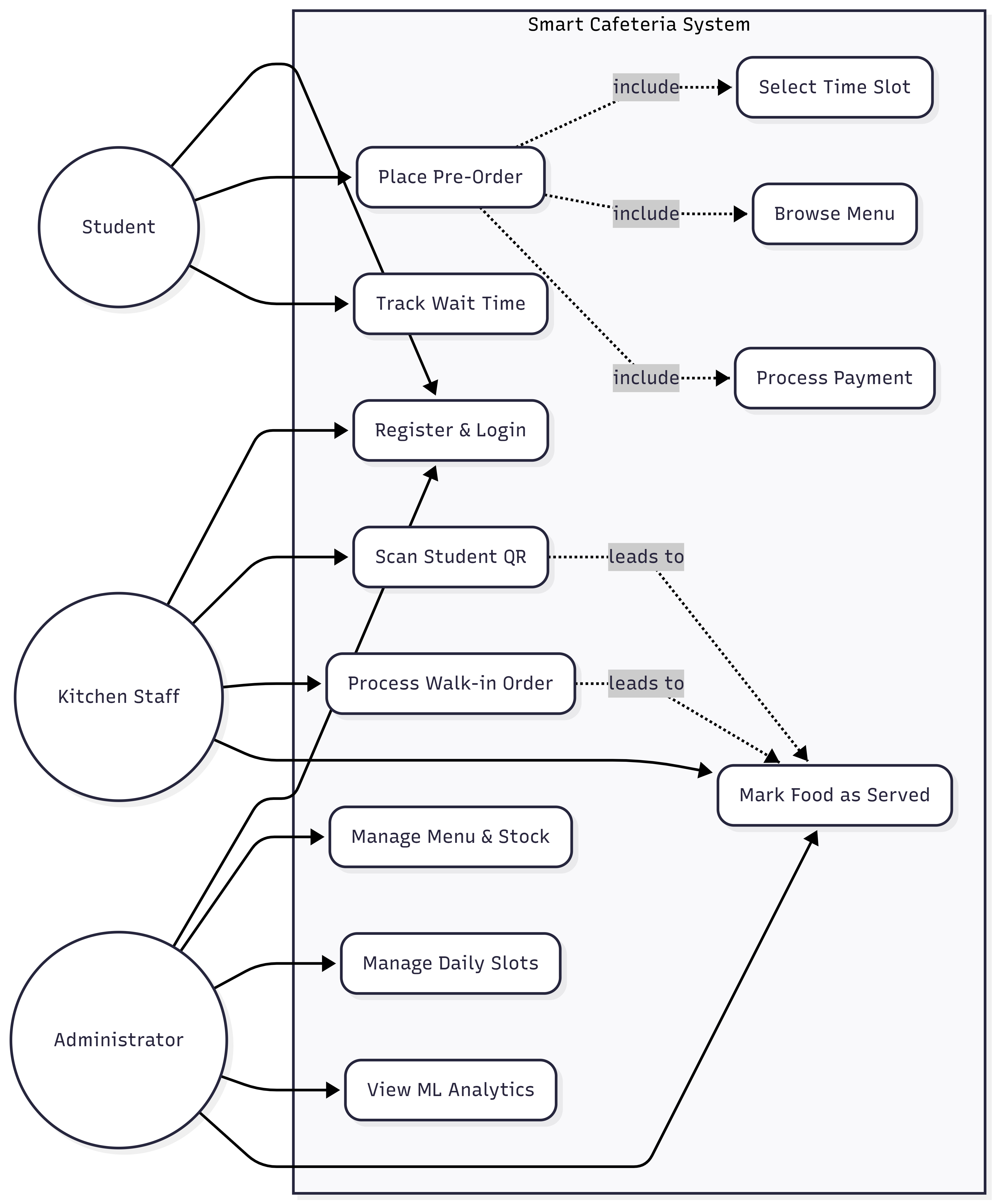
Mobile app flow: Register, login via QR, pre-order food, track queue position, and collect orders.
Kitchen Staff
Admin panel counter view: Scan ID cards, process walk-in orders, and serve food at stations.
Administrator
Total platform control: Menu & slot management, ML demand analytics, and viewing contact queries.
🎓 Student Guide (Flutter Mobile App)
- 1Open the Smart Cafeteria app and register with your Amrita college email.
- 2Verify the 6-digit OTP sent to your email and set a password.
- 3Login manually or use "Scan ID Card QR" for instant login.
- 1Tap "Order Now" to select an available time slot for your meal.
- 2Browse items (Breakfast/Lunch/Dinner filter automatically applies) and build cart.
- 3Confirm order & pay via digital gateway. See status change to PAID.
- 4App generates your Token number + QR code showing live queue position & wait time.
- 5Show your QR at the counter to mark ARRIVED and move into the active queue.
- 6Collect your food when notified token is SERVED.
👨🍳 Kitchen Staff Guide (Counter Panel)
- 1Login to the web panel using
staff@amrita.edu. - 2Scan Student QR: Click QR Scanner to mark pre-orders as arrived.
- 3Walk-In Orders: Generate a W-xxx token instantly for students with no pre-order.
- 4Station Serving: Use station filters (Snacks/Beverages/Main) and click 'Serve' when food is handed over.
🛠️ Admin Guide (Management Panel)
- 1Login to the web panel using
admin@amrita.edu. - 2Menu Manager: Add, edit, or toggle items out-of-stock instantly.
- 3Slot Manager: Create and manage daily cafeteria time slots with capacity.
- 4Analytics Dashboard: View XGBoost ML demand predictions, top items, peak hour graphs, and weather correlations for planning.
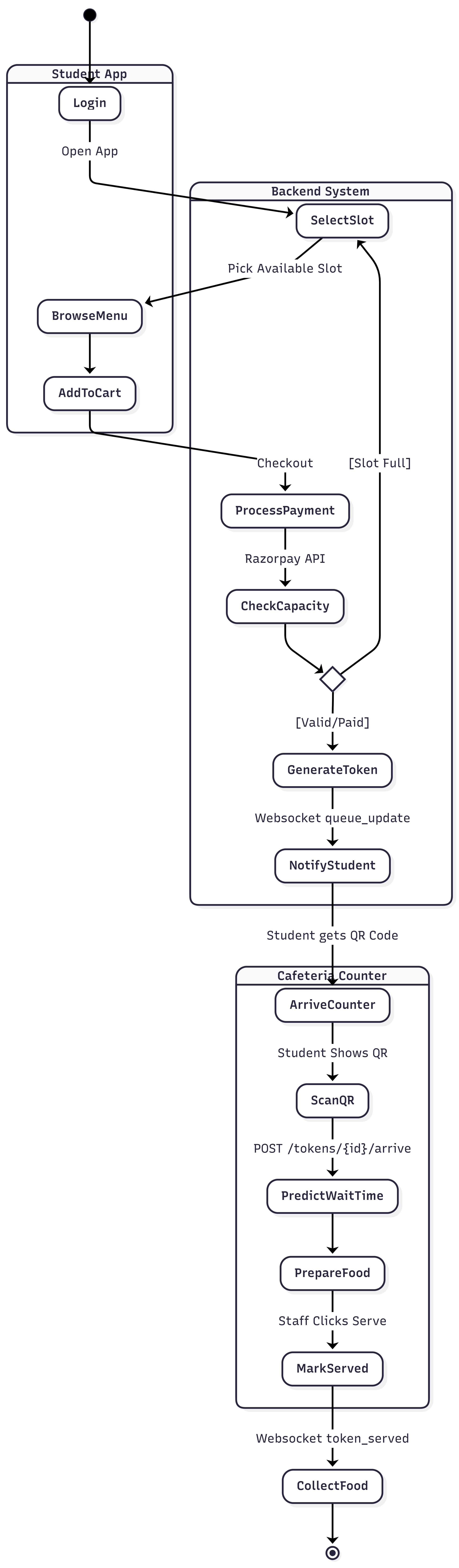
🔄 End-to-End Flow Summary
Student (App)                  Backend (API)              Staff/Admin (Web Panel)
─────────────────────────────────────────────────────────────────────────────────
Register → OTP Verify     →   Create Account
Login                     →   Get JWT Token
Select Slot + Build Cart  →   Check Availability          Admin: Create Slots
Place Order + Pay         →   Create Order + Token
                          →   WebSocket: queue_update  →  Admin receives update
Arrive at Cafeteria       →                           ←   Staff: Scan QR Code
                          →   Mark ARRIVED + Queue
                          →   WebSocket: token_arrived
Wait for token number     →                           ←   Staff: Mark Served
                          →   Token status = SERVED
→ WebSocket: token_served → Student: notifiedDeveloper Documentation
Project stack details, cloud deployment, and codebase structure.
⚙️ Backend — FastAPI (Python 3.11+)
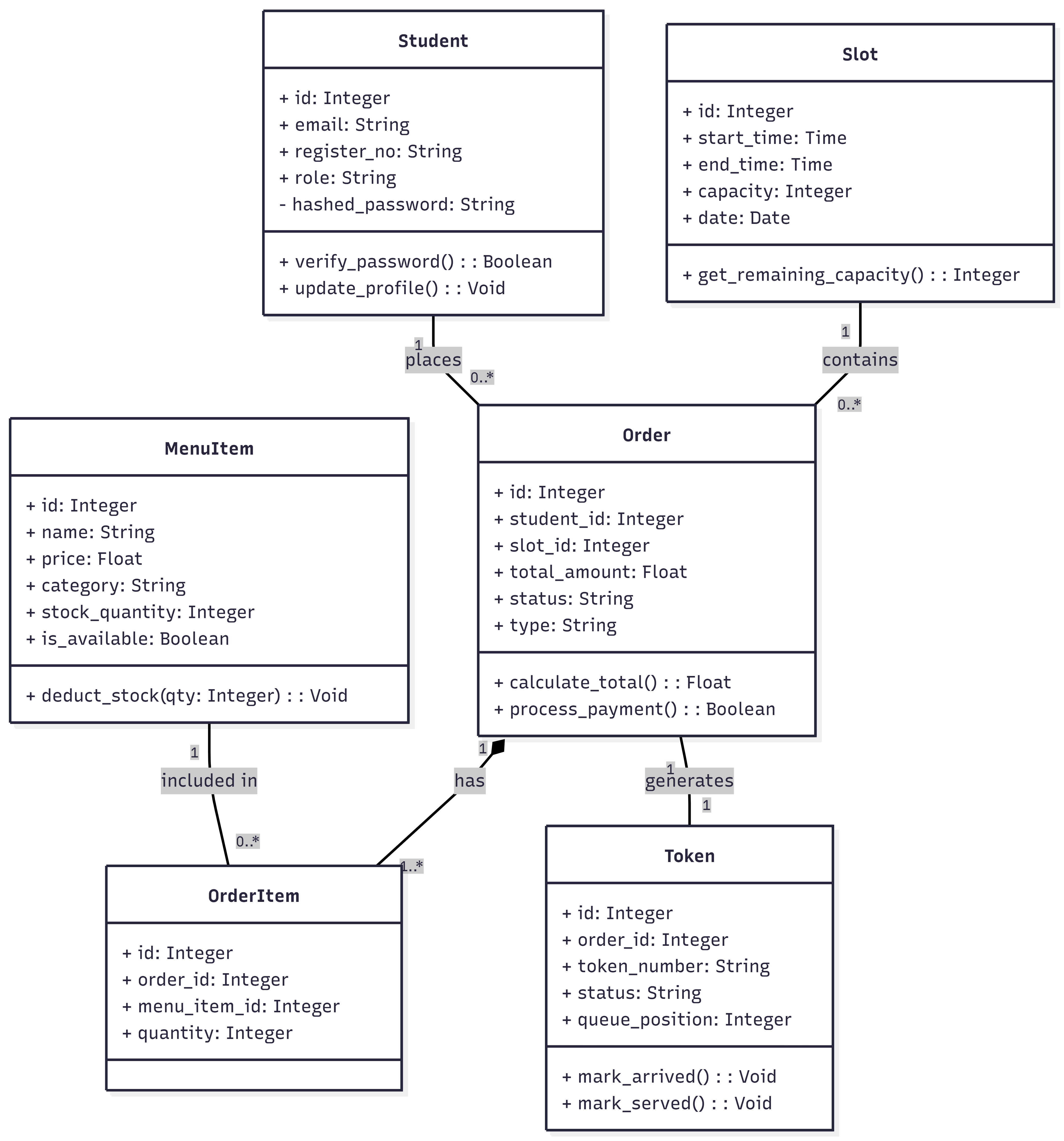
| Model | Key Fields | Description |
|---|---|---|
Student |
id, email, register_no, hashed_password, course | Student account data |
Order |
id, student_id, slot_id, status, type | Main order container (PRE_ORDER/WALK_IN) |
Token |
id, order_id, token_number, status, position | Queue ticket |
Slot |
id, start_time, end_time, capacity, date | Menu/Capacity grouping |
MenuItem |
id, name, price, category, meal_types, stock | Master food item list |
📱 Frontend — Flutter 3.x (Student App)
State managed by `setState` + `SharedPreferences` for token storage. HTTP calls handled by global API service wrapping endpoints. Navigation pushes screens via named routes and pop contexts.
🖥️ Admin — React 18 + Vite
Role-based sidebar limits staff to Counter/Kitchen views while Admins see fully analytics and structural control. Live tracking uses explicit WebSocket connections merging with Axios hooks.
☁️ Azure Cloud Architecture
| Azure Service | Usage Role |
|---|---|
| App Service (B1 Tier Linux) | Hosts the Python FastAPI backend engine |
| PostgreSQL Flexible Server | Primary relational database engine |
| Blob Storage | Student profile avatars & serialized ML models |
| Application Insights | Backend health check, API monitoring, logs |
| Static Web Apps | Hosts the React Admin application |
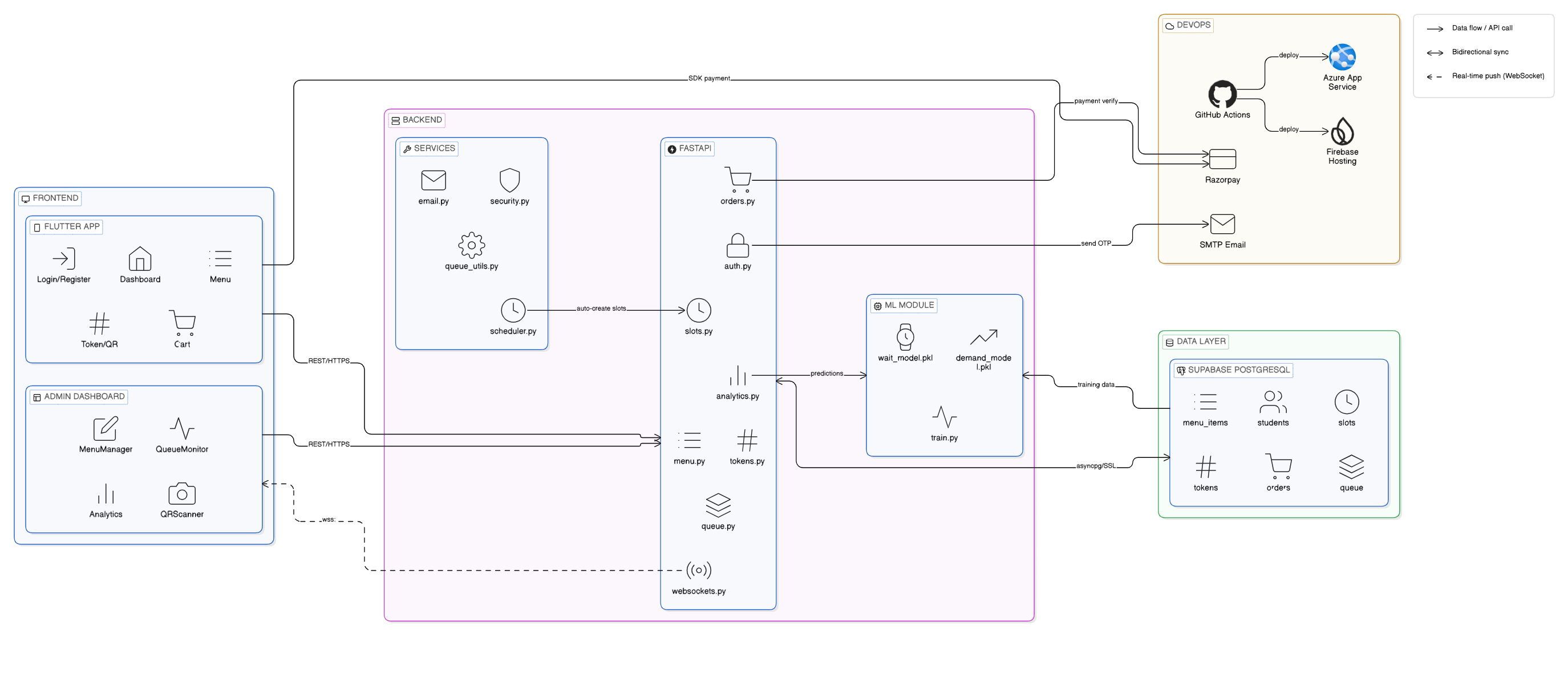
📊 System Diagrams
Complete architectural, structural, and behavioral diagrams for the Smart Cafeteria project.
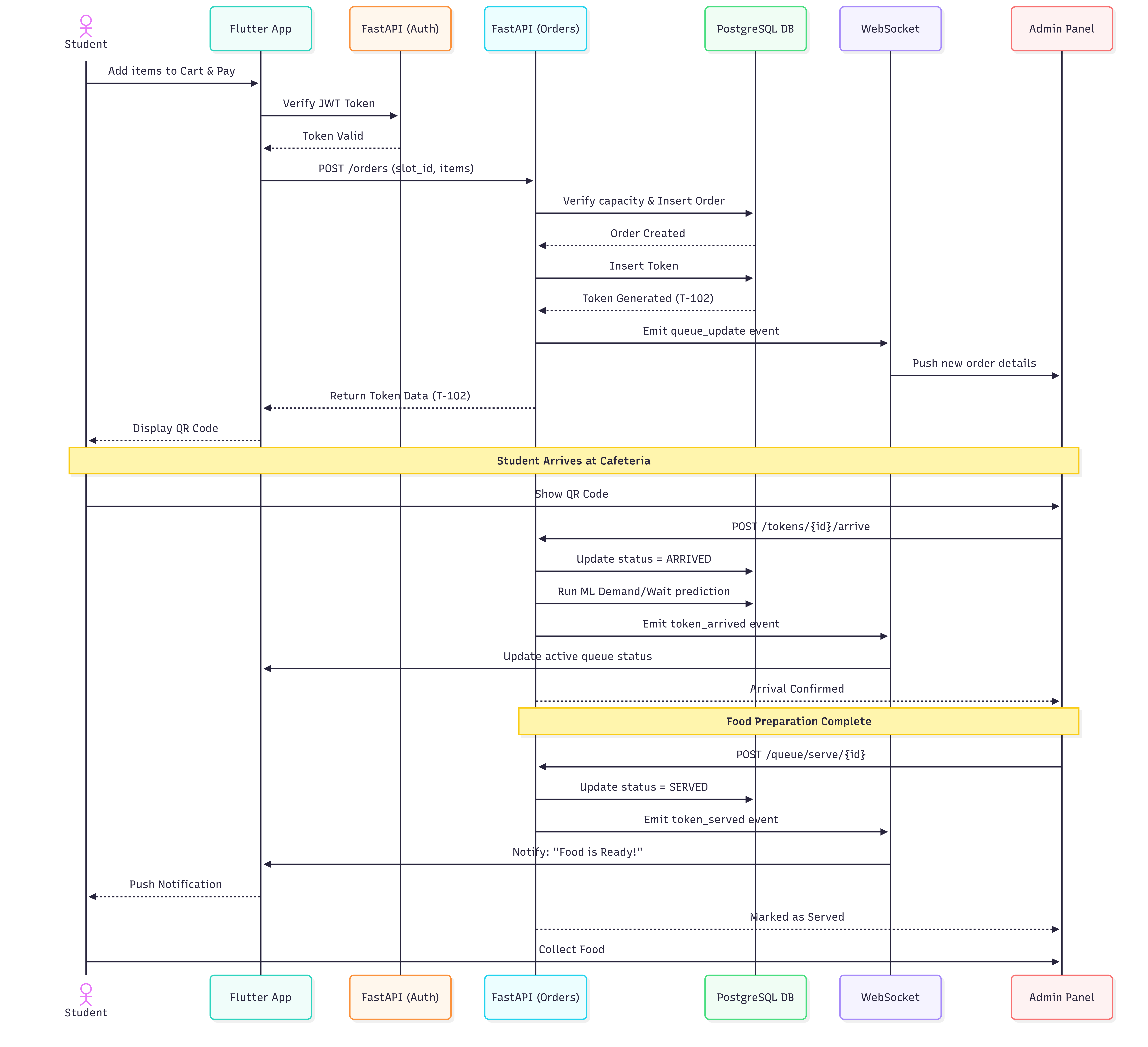
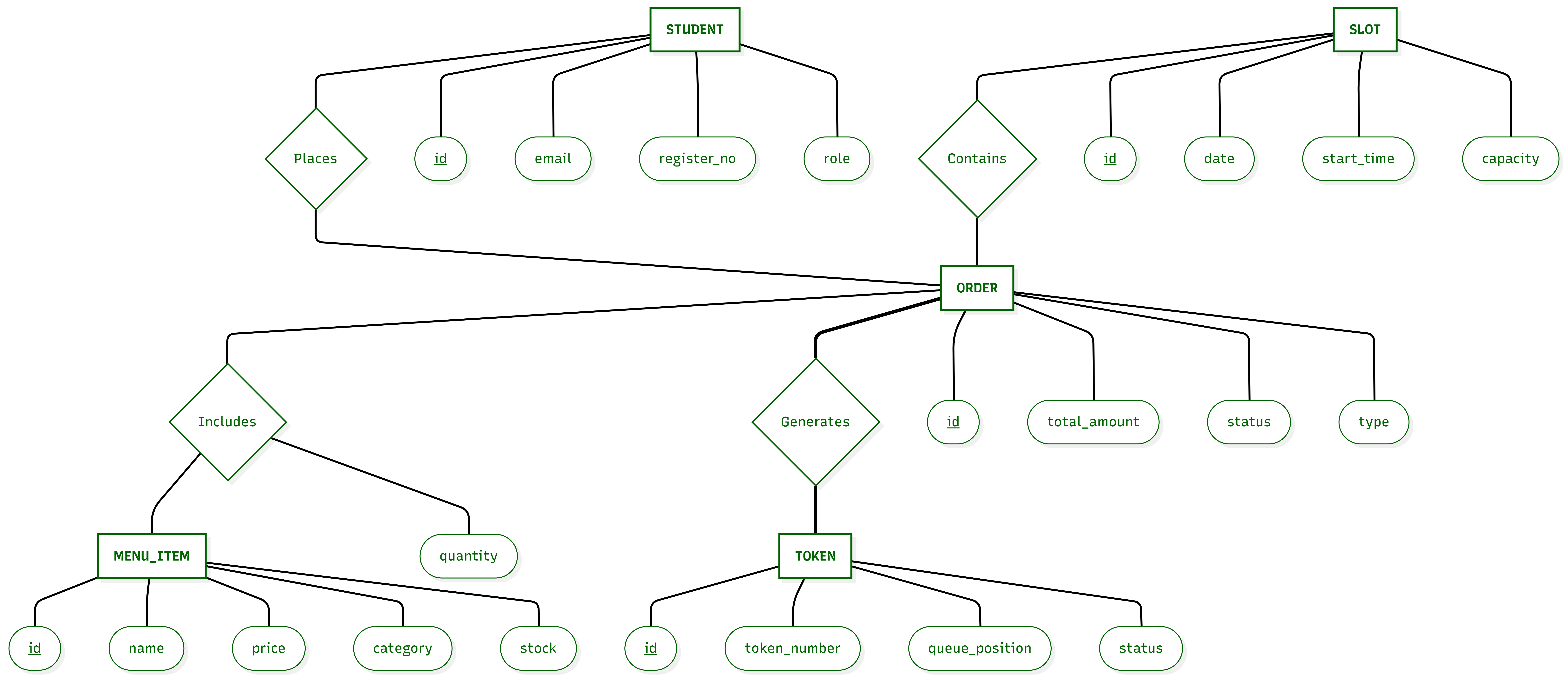
Project Report
A comprehensive overview of the Smart Cafeteria Demand Forecasting and Token-Based Queue Optimization System.
📝 1. Abstract
The Smart Cafeteria system is an intelligent demand forecasting and token-based pre-ordering platform built to optimize college cafeteria operations. By combining a mobile app for students with a real-time ML-powered web panel for staff and administrators, the system eliminates traditional queuing, predicts daily food demand to minimize waste, and streamlines digital payments.
🎯 2. Core Objectives
- 1Reduce Wait Times: Eliminate physical queues through a slot-based pre-ordering system and live wait-time tracking.
- 2Minimize Food Waste: Utilize Machine Learning (XGBoost) to predict food demand based on historical data, weather, and day-of-week trends.
- 3Digitize Payments: Provide seamless digital checkout integrated with Razorpay for secure student transactions.
- 4Real-time Counter Operations: Equip kitchen staff with instant QR scanning, walk-in management, and live order tracking via WebSockets.
🏗️ 3. System Architecture
The application leverages a robust 4-Tier Cloud Architecture deployed on Azure:
- 🖥️Client Tier (Frontend): Flutter Mobile App for Students and a React (Vite) Admin Dashboard for Counter Staff & Administrators.
- ⚙️Backend/API Tier: Asynchronous Python
FastAPIEngine serving RESTful endpoints and WebSocket streams. - 🐘Data Tier:
PostgreSQL(hosted on Supabase/Azure) for relational data and Azure Blob Storage for media assets. - 🧠Intelligence Tier: Integrated
XGBoostML Models for historical demand forecasting and queue duration estimation.
✨ 4. Key Features Implemented
- 🎓Amrita ID Integration: Sign up and login instantly using institutional email ID or ID Card QR Code.
- ⏰Slot Selection: Pick available time intervals (e.g., Lunch 12:30-1:00 PM) to manage crowd flow.
- 📍Live Queue Tracking: View live queue position and estimated wait time directly from the app.
- 📷Rapid QR Check-in: Instantly verify pre-orders via QR scanner at the counter.
- 🍔Dynamic Menu Management: Toggle availability, update prices, or add categories instantly.
- 📊Demand Forecasting Analytics: View projected item sales to prepare bulk ingredients efficiently.
💻 5. Technology Stack Summary
| Category | Technologies |
|---|---|
| Mobile App | Flutter 3.x, Dart, Provider/SetState |
| Web Admin | React 18, Vite, TypeScript, Recharts, Axios |
| Backend API | Python 3.11+, FastAPI, SQLAlchemy, WebSockets |
| Database | PostgreSQL, Azure Blob Storage |
| Machine Learning | scikit-learn, XGBoost, Pandas |
| Cloud & DevOps | GitHub Actions, Azure App Services, Firebase Hosting |
| External Services | Razorpay API, SMTP |